
Working from home has become a norm for many people, making it more important than ever to have a comfortable and efficient workspace. However, clutter can quickly pile up and distract you, reducing productivity and increasing stress. Fortunately, organizing a clutter-free and efficient workspace at home is achievable with a few thoughtful steps. This guide will walk you through practical tips to help you create a workspace that fosters concentration and comfort.
Why an Organized Workspace Matters
Before diving into the how-to, it’s helpful to understand why an organized workspace makes a difference. A tidy area helps minimize distractions, reduces the time spent looking for items, and boosts your ability to focus. Additionally, a well-arranged workspace can improve your mood, making your work feel less like a chore.
Start with Decluttering
The first step is to clear out unnecessary items. Here’s a simple way to do this:
– Remove everything: Take all items off your desk and shelves.
– Sort items: Group them into categories like essential work tools, personal items, and things you no longer need.
– Decide what stays: Keep only items that you use regularly or that inspire you.
– Find a new home: Relocate or donate items that don’t belong in your workspace.
Decluttering creates a blank slate and makes organizing easier.
Choose the Right Furniture and Layout
Your furniture and how you arrange it significantly affect workspace efficiency.
– Desk size: Pick a desk big enough to hold your necessary equipment but not so large that it encourages clutter.
– Ergonomic chair: Invest in a supportive chair to maintain good posture.
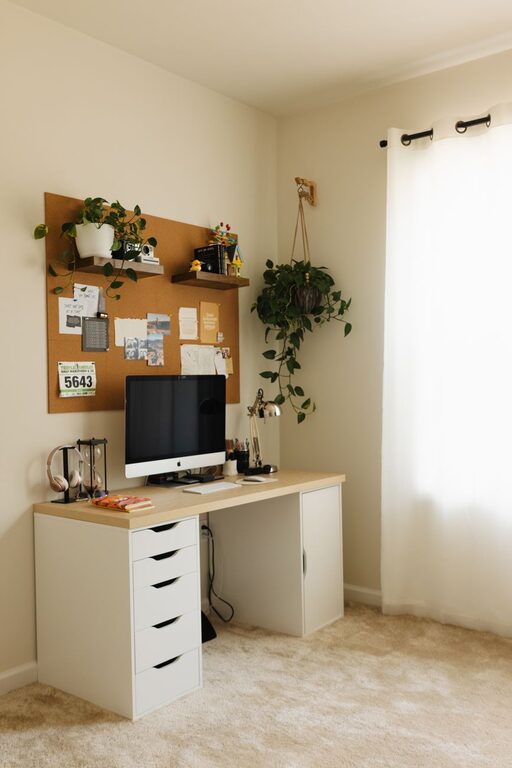
– Natural light: Position your workspace near a window if possible. Good lighting enhances focus and reduces eye strain.
– Layout: Place frequently-used items within arm’s reach to avoid unnecessary movement.
Create Dedicated Zones
Dividing your workspace into zones can improve workflow.
– Work zone: The main desk area with your computer, keyboard, mouse, and essentials.
– Storage zone: A nearby shelf or drawer unit for files, supplies, and reference materials.
– Inspiration zone: A small space with personal touches like photos, plants, or motivational quotes.
Designing these zones clarifies what belongs where and limits clutter buildup.
Use Practical Storage Solutions
Smart storage is key to maintaining order over time.
Desk Organizers
– Use trays or small containers to hold pens, paper clips, and sticky notes.
– A vertical file sorter can keep important documents upright and accessible.
Shelves and Drawers
– Adjustable shelves allow you to store items of varying sizes.
– Drawer dividers create compartments, making it easier to locate supplies.
Cable Management
– Use cable clips or sleeves to bundle cords.
– Label chargers and cables to quickly identify them.
Keep Digital Files Organized
A clutter-free workspace includes your computer desktop and files.
– Create folders for different projects.
– Regularly back up files.
– Delete or archive files you no longer need.
Digital organization reduces the time and frustration associated with searching for documents.
Maintain Your Workspace Daily
Building good habits prevents clutter from returning.
– Spend 5 minutes at the end of each day tidying your area.
– Put items back in their designated spots immediately after use.
– Avoid piling up documents; deal with mail and paperwork as soon as they come in.
Personalize Thoughtfully
Adding personal touches can make your workspace more inviting but be mindful:
– Limit decorations to avoid clutter.
– Choose items that inspire or relax you, like a small plant or a photo.
– Rotate decorations to keep the space fresh.
Incorporate Break Areas (if space allows)
Having a small spot to stretch or relax can boost productivity.
– A comfortable chair or cushion nearby encourages short breaks.
– Consider a standing desk option if it fits your workflow.
Final Thoughts
An organized, clutter-free workspace at home is not a one-time project but an ongoing process. By starting with decluttering, arranging your furniture thoughtfully, using practical storage, and maintaining daily habits, you can build an environment that supports your best work. Remember, your workspace should feel comfortable, inspiring, and efficient—helping you make the most of your work-from-home experience.
Related Posts
Tips for Creating a Cozy and Functional Home Workspace
Creating a cozy and functional home workspace can make a…
Tips for Creating a Cozy and Productive Home Office Space
Creating a home office that feels both cozy and productive…
Tips for Creating a Cozy and Productive Home Office Space
Creating a cozy and productive home office space is essential…